
The workout session on the watch
How a workout is organized in WeFit Go: the exercise list, each exercise's view with its sets, the target editor with the Digital Crown and the Completar button.
When you open a workout in Hoy (Today), the watch shows the session: the list of exercises with their sets. From here you can log set by set, adjust each set’s targets, add exercises and mark the workout as finished. If you’d rather have the watch guide you, the play button opens the player.
Steps
Tap the day’s workout in Hoy. The header shows the name and a counter of completed exercises, for example “0/6 EJERCICIOS” (exercises). Each exercise appears with its number of sets and its type, such as “FUERZA SERIE” (strength set). At the top right is the play button and, next to the header, the ⋯ button with the workout options.
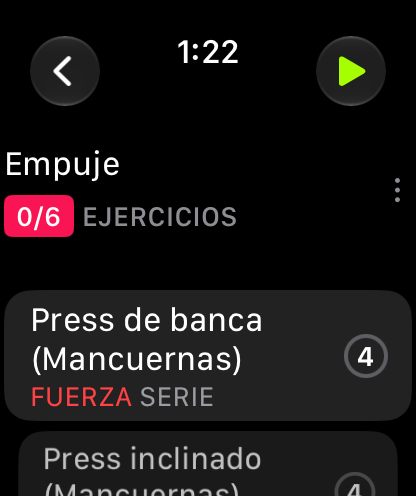
The session: exercise counter and list with each exercise's type. At the end of the list there are two buttons: + Ejercicio (Exercise), to add one more exercise to the workout, and ✓ Completar (Complete), to close the session. Exercise types are distinguished by the label on each card, for example “INTERVALOS SERIE” (interval set) or “FUERZA SERIE”.
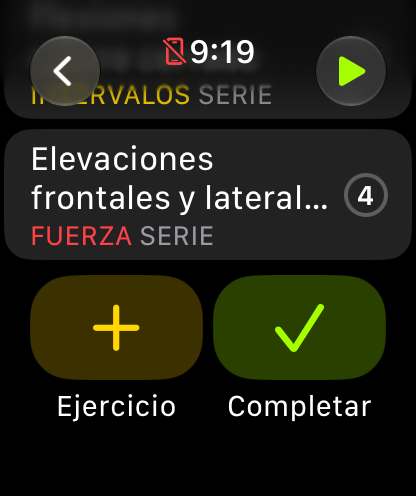
Add an exercise or complete the workout, at the end of the list. Tap an exercise to see its sets. Each row is a set with its target and the rest that follows it, for example “10 REP × 8kg · +45s”. The letter on the right indicates the set type: W is warm-up, D is drop set and regular sets are numbered. Tap the set to edit it or mark it as done.
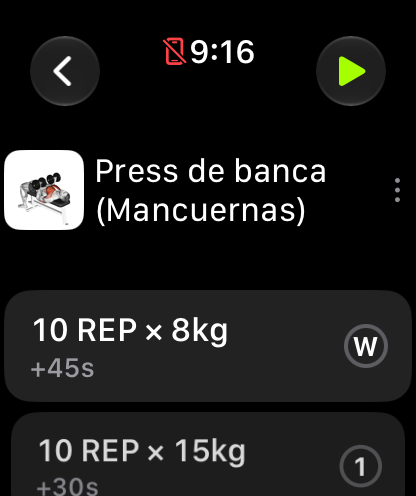
An exercise's sets, with the rest for each one. The target editor shows one page per value. On REP you see the number in large type with the − and + buttons. Swipe horizontally to move to the other pages (weight and other set settings). The Digital Crown also raises and lowers the value. Confirm with the checkmark at the top right or close with the X.
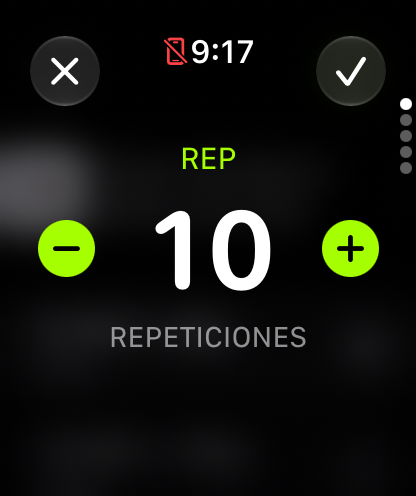
One page per value: reps, weight and the rest of the settings. If you tap the number, a numeric keypad opens with the digits 0 to 9, the delete button in red and OK at the top to accept. It’s the quick way to enter a specific value without pressing the buttons repeatedly.
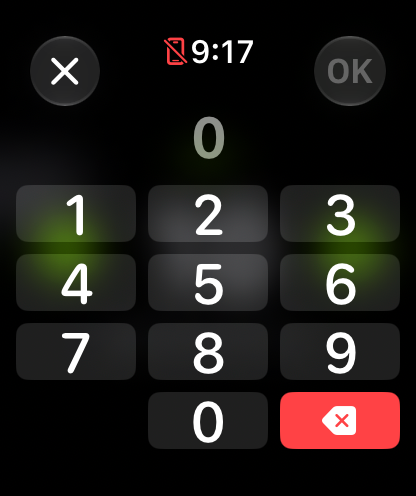
The numeric keypad, for typing the value directly.
Superset, circuit and tabata blocks
When several consecutive exercises share a mode other than normal, such as superset, circuit or tabata, the session groups them into a continuous block with its own header. In the player, those sets are chained in turns across the exercises in the block.
Common problems
I can’t find the Completar button
It’s at the end of the exercise list, next to + Ejercicio. Turn the Digital Crown or swipe up to the last exercise.
I changed a value and it wasn’t saved
Editor changes are applied when you confirm with the checkmark at the top right. If you close with the X, the set stays as it was.
I want to see the full exercise name
Long names are truncated in the list. In the exercise view it appears in full and, if you tap the name, its page opens. It’s explained in The exercise page on the watch.
How did this guide go for you?
Thanks for your feedback