
Share a workout or your activity from the watch
How to send a workout with a link from WeFit Go, import one by scanning a QR code and share your activity calendar with friends.
From the watch you can share two things: a specific workout, with a public link, and your full activity, so a friend can follow you from WeFit. Both options generate a link that you send with the watch’s share sheet.
Share a workout
Open the workout in Hoy (Today) and tap the ellipsis button in the header. You’ll see the workout’s Nombre (Name) and, below it, Escanear QR (Scan QR) and Compartir (Share).
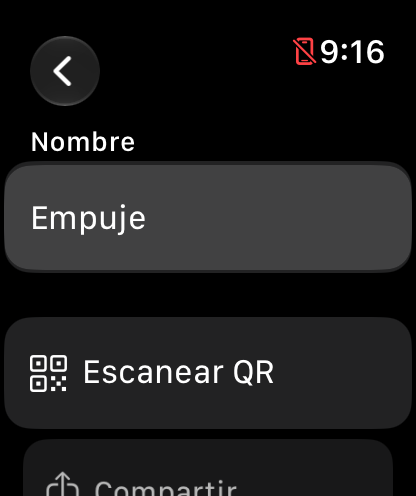
The workout options. Tap Compartir to send the workout link. As the screen itself warns, the link is public: it opens without an account. Below, under Descansos (Rests), you can set a rest time that will apply to all sets.
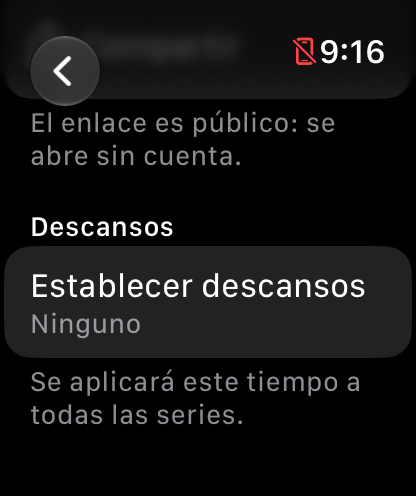
The link is public: anyone can open it.
Share your activity
In Ajustes (Settings), inside the Amigos (Friends) section, tap Compartir mi actividad (Share my activity). This shares the public link to your calendar, the same one you can send from the iPhone.
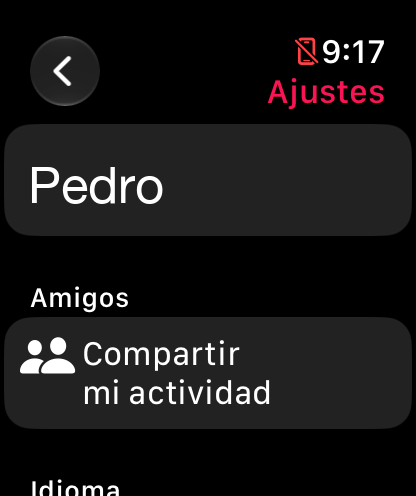
Compartir mi actividad is in Ajustes. Whoever receives the link can follow you and repeat your workouts from WeFit. We explain how the shared calendar works and how to add friends in Add friends and share your calendar.
Common problems
I don’t want the workout to be public
The workout link opens without an account. If you don’t want to share it that way, use the image card from the iPhone: Share a workout as a link or image.
The share sheet doesn’t show the app I want
The watch’s share sheet only lists apps installed on the Apple Watch that support links. If yours is missing, share the same workout from the iPhone.
How did this guide go for you?
Thanks for your feedback