
Sign in on the watch with the QR code
How to sign in to WeFit Go on the Apple Watch without typing: the watch shows a QR code, you authorize it from the iPhone and grant Health permissions.
WeFit Go doesn’t ask for a username or password on the watch. The first time you open it, it shows a QR code; you scan it with the iPhone, authorize the watch from the WeFit website and the app signs in on its own with your account. It’s the same account you use on the iPhone, on Android and on the web.
Steps
Open WeFit Go on the watch. You’ll see the sign-in screen with the text “Escanea el código con tu iPhone o escribe el código en app.wefit.es/link” (Scan the code with your iPhone or enter the code at app.wefit.es/link) and a QR code.

The sign-in screen only shows a QR code: nothing to type. Point the iPhone camera at the QR code and open the link that appears. If you prefer to do it by hand, turn the Digital Crown to see the code of letters and numbers below the QR code and enter it at app.wefit.es/link from any browser.

Below the QR code is the same code as text. On the website, sign in with your WeFit account if you aren’t already signed in and click Autorizar Apple Watch (Authorize Apple Watch). The watch detects the authorization and signs in on its own, with nothing else to tap.
As soon as it signs in, the watch asks for access to the Health app. Tap Revisar (Review).
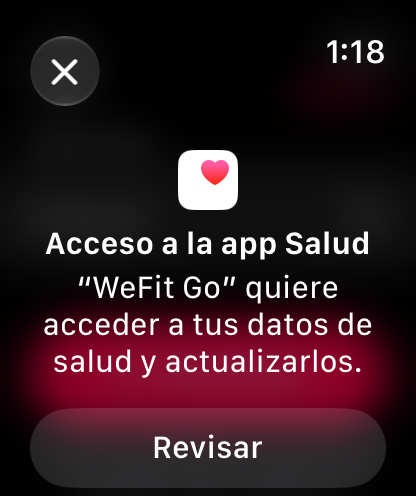
Without this permission the player can't measure time, calories or heart rate. First, write access: turn on the main switch (“Los datos que se solicitan a…”, the requested data) and scroll down to Siguiente (Next).
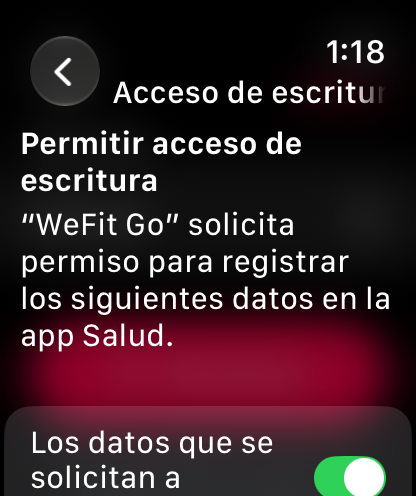
The main switch turns on all the data at once. Then read access: turn on the main switch as well and tap Continuar (Continue).
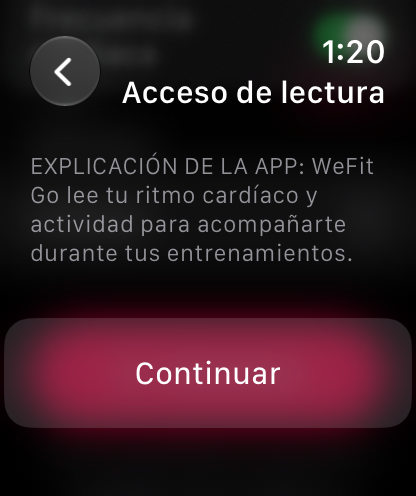
Read access lets it show your heart rate during the workout. Choose how much history to share, for example Todo el historial (All history), and tap OK.
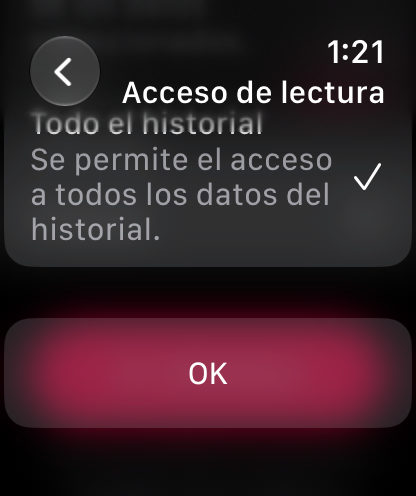
You can limit the history if you prefer. You’re in. The Hoy (Today) screen shows the day’s workout with its number of exercises, the button to add workouts and a motivational phrase.
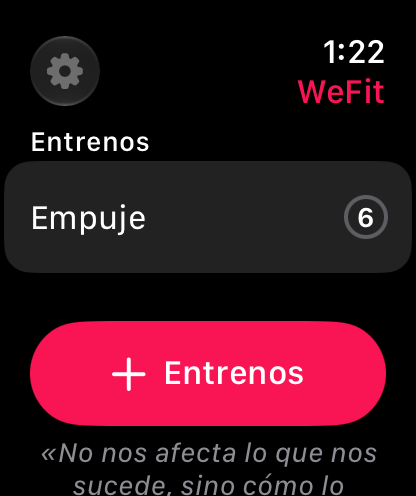
Hoy, the watch's main screen.
Common problems
The website says the code has expired
Each code is valid for five minutes. On the watch, scroll down to the Generar nuevo código (Generate new code) button and repeat the process with the new code.
I authorized it and the watch is still on the QR screen
Give it a few seconds: the watch checks for authorization periodically. If it doesn’t move on, check that the watch has an internet connection and that you authorized exactly the code it shows now, not an earlier one.
I declined the Health permissions
You can grant them later from the Health app on the iPhone, in the apps section. Until then the player works, but without calories or heart rate.
Will I have to do this again?
No. Once authorized, the session stays saved on the watch. You’ll only have to repeat it if you sign out from Ajustes (Settings).
How did this guide go for you?
Thanks for your feedback